Power Users & Maintenance

How to Schedule Automatic Cache Clearing in Google Chrome

Clear Cache Chrome · Tech Product Partners KFT.

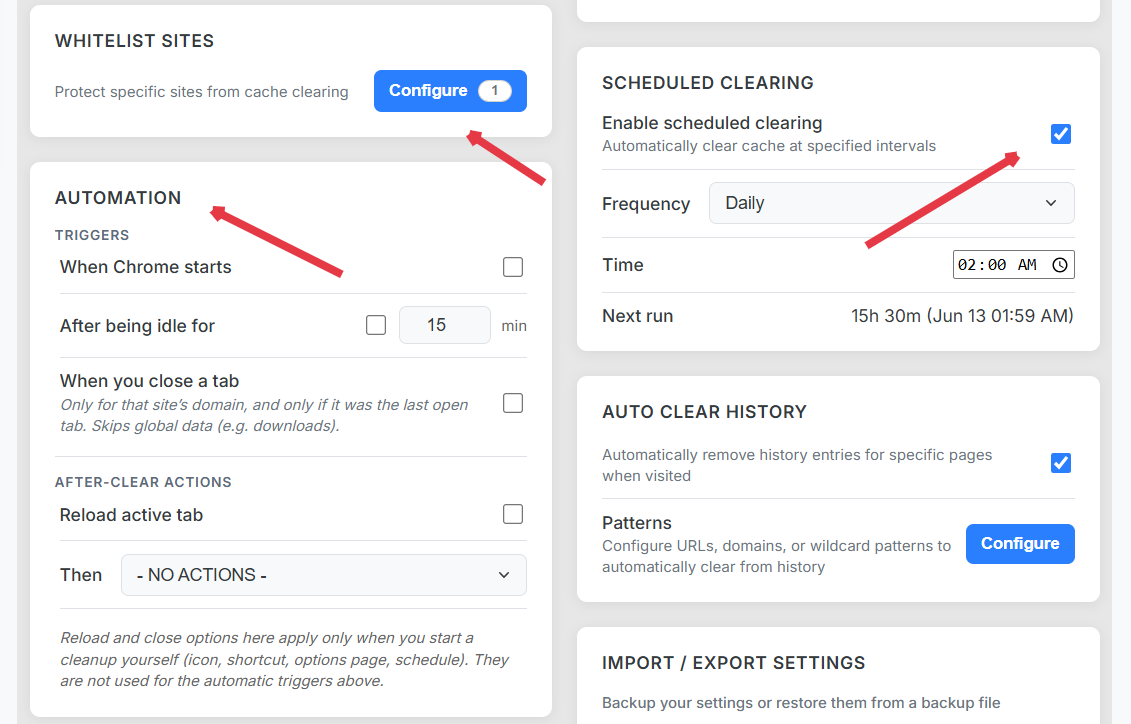
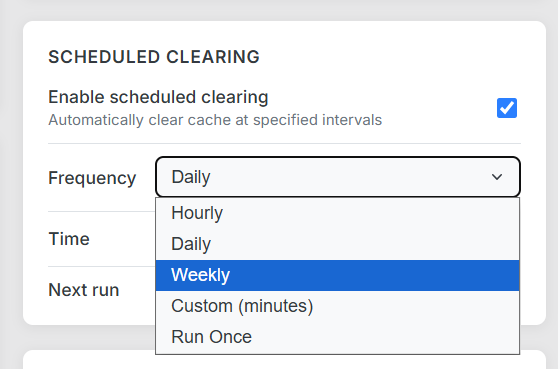
Clear Cache Chrome supports scheduled cache clearing and startup cleanup: define intervals (daily, weekly) or run on browser launch with explicit scope and whitelist guardrails — true set-and-forget maintenance.

Schedule and startup cleanup configuration with daily interval and whitelist rules

Set-and-forget browser maintenance

Power users and IT-minded folks want schedule cache clear chrome behavior — daily hygiene without manual reminders. The risk is always over-clearing; guardrails matter.

Startup vs. scheduled triggers

  • Startup: fresh baseline each morning; pair with all-sites cache-only (no cookies).
  • Scheduled: nightly 2 AM cleanup for shared kiosks or dev machines.
  • Interval: every N hours for long-running sessions.
Scheduled cache clearing and startup cleanup configuration screen
Schedule and startup triggers with transparent execution logs.

Safe defaults

  1. Start with cache + cache storage only.
  2. Whitelist SSO and email domains.
  3. Enable logs and review the first week.
  4. Add cookies to scope only when needed.

Combine with cache size tracking to tune schedule frequency.

Frequently Asked Questions

Can you schedule cache clearing in Chrome natively?

Chrome has no built-in cache schedule. Extensions like Clear Cache Chrome add timer and startup triggers.

What is startup cleanup?

A cleanup run when Chrome launches — useful for overnight cache bloat on machines that stay logged in.

Will scheduled clearing log me out?

Only if you include cookies for all sites without a whitelist. Scope cookies narrowly or protect domains via whitelist rules.