
Privacy Advocate

Zero-Touch Privacy: Setting Up Tab-Closed and Idle Browser Cleanup

Clear Cache Chrome · Tech Product Partners KFT.

Configure Clear Cache Chrome to run cleanup when a tab closes or after idle minutes. This delivers chrome clear cache on exit behavior for specific sites — without the risk of a global browser wipe every time you quit Chrome.

Automation settings with tab-closed and idle triggers configured plus scope guardrails

On-exit cleaning without collateral damage

Users searching chrome clear cache on exit want a fresh browser next launch — but Chrome's native options lack per-site granularity. Global on-exit wipes break SSO sessions across work tools.

Tab-closed trigger setup

  1. Create an automation rule: trigger = tab closed.
  2. Scope = current site of closed tab (or pattern list).
  3. Data types = cache, cookies, history as needed.
  4. Review logs to confirm expected behavior.
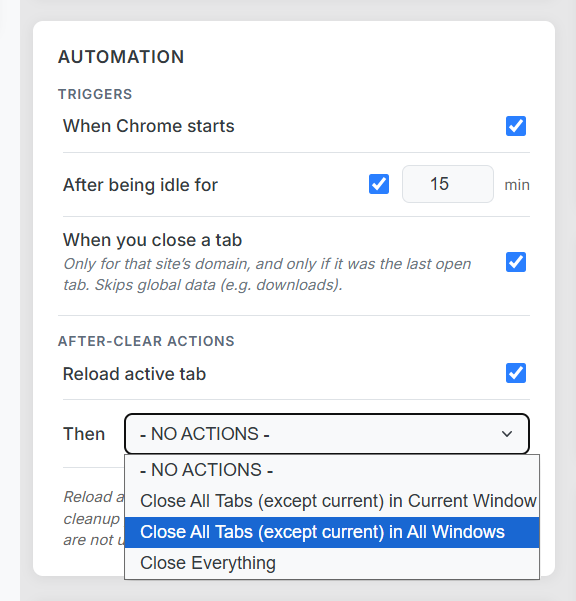
Automation engine settings for tab-closed and idle cleanup triggers
Tab-closed and idle triggers with scope guardrails.

Idle cleanup for shared devices

Set idle timeout to 15–30 minutes. When you step away, sensitive tabs leave no cache footprint. Whitelist work domains so Slack and email stay connected.

Clear browsing data when idle

Unlike OS screen-lock, idle browser cleanup targets browser state only — faster and reversible via whitelist tuning.

See also: surgical history deletion for the same automation engine.

Frequently Asked Questions

Does Chrome clear cache on exit by default?

No. Chrome retains cache across sessions unless you use an extension or policy to trigger cleanup on close or idle.

What is idle cleanup?

After N minutes of inactivity, the extension runs a scoped cleanup — useful for shared machines or privacy breaks.

Can I limit on-exit cleaning to one site?

Yes. Scope rules ensure only configured origins are cleaned when their tab closes.